Colorful Optical Illusion
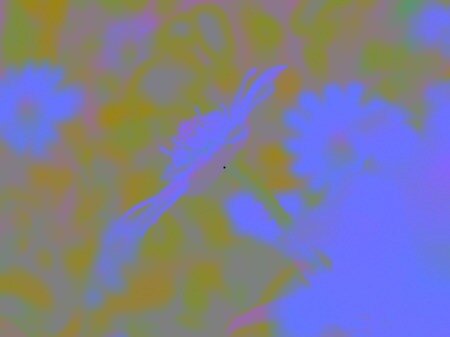
I like optical illusions. When I first saw the Big Spanish Castle (via BoingBoing) I was really impressed because I’ve never seen this kind of illusion before. So I created my own versions using pictures I took about a year ago.
All you have to do is:
- Make sure the pictures change when you click them (i.e. JavaScript needs to be enabled).
- You have to see the color picture to begin, not the black and white one. Click to get the color picture should you see the black and white one.
- Stare at the black dot for about 30 seconds.
- Don’t move you head or eyes!
- Click a picture to change to the black and white version.
- Instead of the black and white version you see a colored version with natural colors. But this is just an illusion!


If you want more of this browse to the following sites:
The last site has more interesting pictures that make your head spin. Have fun!
July 19th, 2006 at 00:32
[...] Cinnamon Thoughts – Colorful Optical Illusion which is a nice visual trick. [...]
August 7th, 2006 at 18:33
this one doesn’t really work that well.. maybe i’m doing it wrong
August 7th, 2006 at 19:32
Be sure not to blink or move your eyes while staring at the dot. Then it should work.
August 8th, 2006 at 20:59
others all work but i can’t get this one to work..
August 8th, 2006 at 22:12
I’ve reworked the original images and added two more. Now they are more like the Spanish Castle. Tell me which ones work (best) now. I’m curious (and to tired to test them myself)!
October 3rd, 2006 at 01:34
I didn’t believe this optical illusion’s effects would really last overnight but they do! [...]
November 17th, 2006 at 02:39
this is soooooooooooo ausome!!!!!!!!!! how did u do it?
November 17th, 2006 at 21:52
John has a tutorial on his blog. It’s focused on Photoshop though many tools should work. For example Gimp. In step 4 you have to use the mode “Value” instead and change the colors afterwards until they look like in the picture used on the tutorial (you can use “Hue-Saturation” for this). Actually you could use the picture in the tutorial and make it look like the final version to learn how to modify the images with your graphics editor of choice.
January 3rd, 2007 at 18:05
nice i like it
June 7th, 2007 at 00:50
I really like optical illusions!!!!!!! ive been searching the web for all kinds. THX FOR MAKING THESE REALLY AWESOME ONES! IVE BEEN LOOKING FOR GOOD ONES, STILL AM. :)
February 14th, 2009 at 20:08
I ashamedly confirm this doesn’t work when you’re drunk..